What are all the controls in GTA 6 on PS5 and Xbox?
Updated: November 24, 2026Short answer
GTA 6 uses one layout on PS5 and Xbox: L2/LT aims, R2/RT shoots, L3 runs, Cross/A jumps, Circle/B crouches, and in a car R2/RT accelerates, L2/LT brakes and Cross/A is the handbrake. The table lists every on-foot and driving button, and the sections below cover auto drive, flashlight, mask, armor and the rest.
Every button below is for the default control scheme on PS5 and Xbox Series X|S. The two controllers share one layout, so the PS5 button is given first and the Xbox button second throughout (Cross is A, Circle is B, Square is X, Triangle is Y, L1/R1 are LB/RB, L2/R2 are LT/RT, L3/R3 are the stick clicks). The full list for walking and driving is in the table; the rest of the page covers the moves people look for most, one by one.
GTA 6 control schemes: default, Classic and left-handed
Settings has three schemes under Controller. Default is the new layout used on this page. Classic follows the GTA 5 layout: on foot, Cross (A) runs, Square (X) jumps, Circle (B) is melee and L3 (left stick click) crouches. In a vehicle under Classic, Square (X) is headlights and Circle (B) is the melee button. The third scheme is a left-handed layout.
If a button on this page does nothing, check the scheme first. It is the most common reason a move seems missing. Aim response, dead zones and targeting have their own guide on our best controller settings page.
GTA 6 on-foot controls for PS5 and Xbox
Walking is the left stick and the camera is the right stick. Running is no longer a button you mash: click L3 (left stick) to run. Jump and climb share Cross (A), and tapping Cross (A) again right after a climb chains into another jump.

Crouch is a tap of Circle (B). Hold it and your character rests or leans against whatever is nearby. Interact is Triangle (Y), and a long press of L2 (LT) on a person opens a short list of options for talking to them, where Triangle (Y) is normally the friendly choice and Circle (B) the aggressive one. Aggressive choices can bring police.
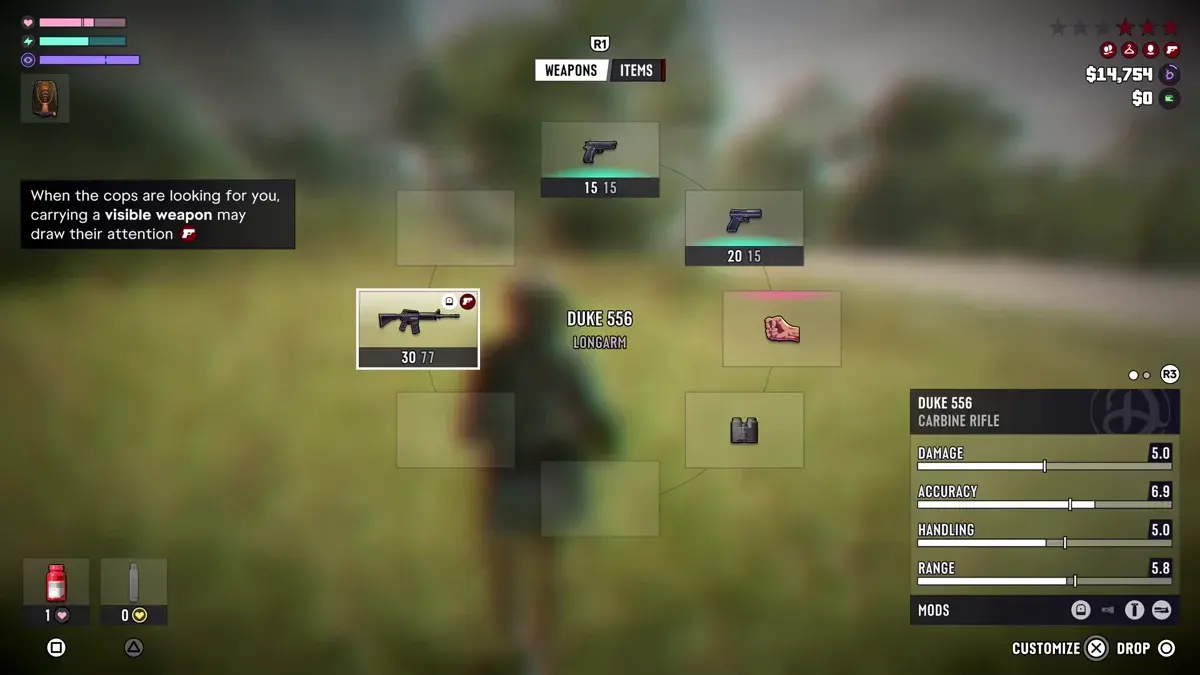
Combat uses the standard shooter layout: L2 (LT) to aim, R2 (RT) to shoot, R1 (RB) for cover. Tap L1 (LB) to holster, hold it to open the loadout wheel. Fighting hands-on has its own page, covered in our melee combat guide.
GTA 6 driving controls for PS5 and Xbox
R2 (RT) accelerates and L2 (LT) brakes and reverses. Steering is the left stick. The handbrake is Cross (A), which is also what you use for drifts and U-turns. Cars, motorbikes and boats all share this layout.
A tap of Circle (B) toggles the headlights, and holding it makes you duck behind the wheel. Left and right on the D-pad are the turn signals, and holding left opens the vehicle menu. Drive-by shooting is R1 (RB), and L1 (LB) draws a sidearm.
Triangle (Y) gets you out of the vehicle. Double-tap it to jump out with the engine still running, which is handy for a quick getaway swap.
How to auto drive in GTA 6
Auto drive is part of the cinematic driving mode. Place a waypoint on the map first, then sit in the car and follow these steps.
1. Hold D-pad down. 2. Press Options on PS5 or Menu on Xbox to start the cinematic camera. 3. Hold Circle on PS5 or B on Xbox. The car now drives itself to the marker. 4. Use L2 and R2 (LT and RT) to ask for a slower or faster pace. Hold D-pad down again to take control.
If the car refuses to start the route, open Settings and check the auto drive option under Gameplay. Set it to Unrestricted. In the restricted setting the car only drives itself when the road is calm, so it will hand control back during a chase.
How to play GTA 6 in first person
There is no first-person mode for the whole game. There are three limited views. Standing still, hold L2 (LT) and press R3 (right stick) to look around in first person, then move the left stick to leave it. Aiming a weapon with a sight and pressing R3 (right stick) puts you behind the optic. In a car, opening the phone with D-pad up moves the camera into the driver's seat.
If R3 on its own does nothing, remember that clicking L3 and R3 together without L2 starts Focus mode instead and drains the meter.
How to turn on the flashlight in GTA 6
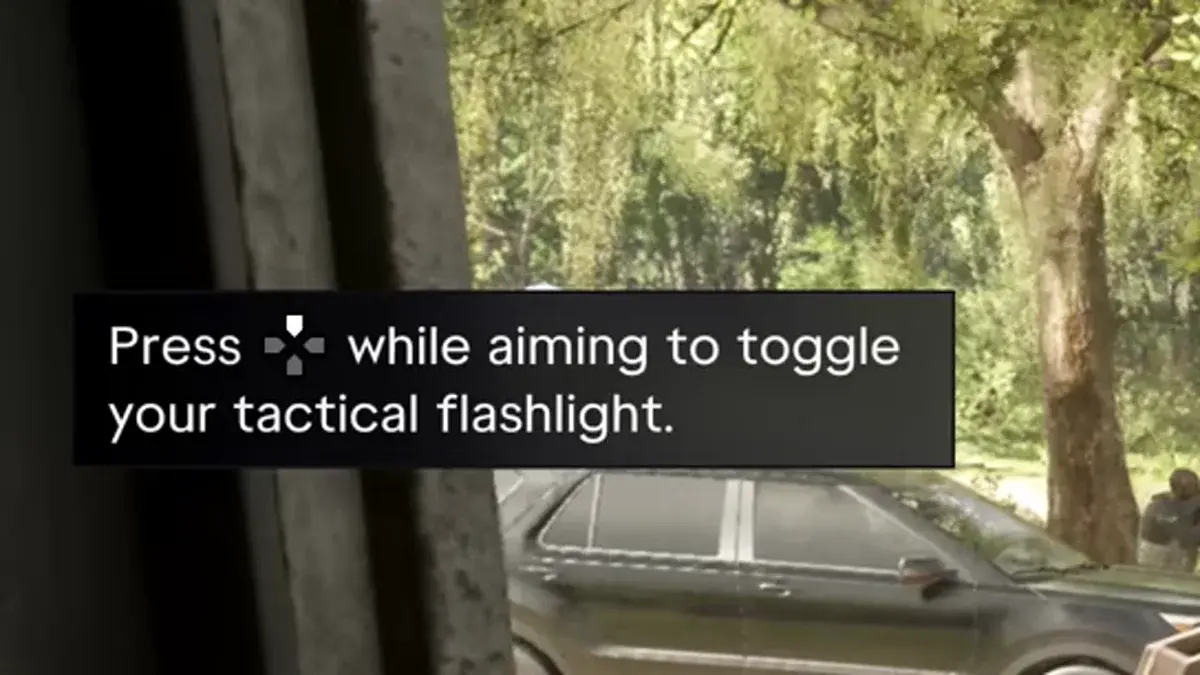
The flashlight is a gun mod, not a pocket item. Aim a weapon that has a tactical light with L2 (LT), then press D-pad up while still aiming. Press up again to switch it off. Without aiming, D-pad up opens your phone.
You can check whether a gun carries a light in the Mods row of the loadout wheel (hold L1 or LB). Jason and Lucia do not share weapon mods, so each of them needs their own lit gun. On scoped weapons, D-pad up while aiming zooms the scope instead.
How to turn the headlights on and off, honk the horn and flip people off
Tap Circle (B) in any vehicle to toggle the headlights. High beams and hazard lights live in the vehicle menu, reached by holding D-pad left. A long press of Circle (B) ducks you down instead, so tap it quickly.
The horn is L3 (left stick click) on PS5 and a click of the left stick on Xbox. It shares its button with nitrous, so with nitrous fitted a long press fires the boost. Press R3 (right stick) while driving to shout at other drivers and pedestrians.
For the middle finger, hold L2 (LT) with your target in view and press R1 (RB) on foot. From behind the wheel, R1 (RB) alone does it. To whistle at someone, hold L2 (LT) on an enemy and use the interaction option shown.
How to drift in GTA 6
Drifting is the handbrake. Come into a corner with speed, steer into it and tap Cross (A) so the rear steps out, then ease the throttle and counter-steer to hold the slide. A tap is enough, because holding the handbrake slows the car right down.
How to use nitrous in GTA 6
Nitrous is bought at any mod shop for around $5,000 per vehicle, under Performance, then Boost, then Nitrous Boost. Cars and motorbikes can take it. Once fitted, hold L3 (left stick click) while moving. The tank empties and refills by itself in about 30 seconds. Press D-pad down to see the blue tank icon above the minimap. Some stolen cars already come with it. The full details are in our nitrous guide.
How to lower the roof on a convertible (drop top)
Hold D-pad left to open the vehicle menu and look for the roof entry on a convertible. The same menu handles windows, high beams and hazard lights, and the radio too. Push the right stick up or in the direction shown to select an entry.
How to lean against a wall or car in GTA 6
Walk up to a wall, a car or a dock edge and hold Circle (B). The character leans or sits down and stays there until you move. Hold L3 (left stick click) near a railing or ledge to rest on it instead.
How to hide in a car in GTA 6
Hold Circle (B) while driving. Your character slides down behind the dashboard, which breaks line of sight with police and enemies. Let go to sit up again.
How to flip a car back onto its wheels in GTA 6
There is no flip button. Walk into the side of the overturned vehicle with the left stick and your character braces and pushes it back onto its wheels. If you are on foot beside a car, a click of L3 followed by a hold of Square (X) shoves it. Boats and jet skis stuck on a beach are pushed into the water by holding L1 (LB).
How to change the radio in GTA 6
In a vehicle, hold D-pad left to open the radio and vehicle menu, then use L1/R1 (LB/RB) to change station. Double-tap D-pad left to turn the radio off. On foot, the same D-pad left opens the radio menu if you have earbuds or headphones equipped from the inventory. The full station list is on our radio stations page.
How to zoom out on the map in GTA 6
Open the map with the touch pad on PS5 or View on Xbox, or choose Map in the pause menu. The map screen shows its own prompts along the bottom: Cross (A) sets a destination and Square (X) adds a marker. Zoom is on the triggers. The more you zoom out the fewer streets show, and zooming in reveals side roads and alleys.
How to pass time and wait until night in GTA 6
There is no wait option in the menus. The only free way to move the clock is to sleep in a bed in one of your safehouses. Walk to the bed, press the Rest prompt (Triangle on PS5, Y on Xbox), choose Alarm and pick one of the wake-up times: around 7:00 AM, 12:30 PM, 6:00 PM or just after midnight. To reach a time in between, sleep to the nearest slot and let the clock run. Taxis and ride-hailing journeys also advance the time, for a fee.
How to put on a mask in GTA 6
Hold L1 (LB) to open the loadout, press R1 (RB) to switch to Items and highlight the mask slot. Confirm with the prompt on screen, then use the D-pad to change the wear style between hanging at the neck and pulled up over the face. Masks and bandanas are sold on the Neckwear shelf of gun shops and clothing stores. If a mask you own is missing, add it from the wardrobe in your safehouse under Accessories, because Jason and Lucia each need their own.
Wear it covering the face for robberies, and lower it when you shop, since clerks react badly to a covered face. Take it off after a chase to cool down the way witnesses remember you.
How to equip body armor in GTA 6
Body armor is bought at Ammu-Nation for around $250, though prices can vary by store. Choose Buy and Equip to wear it straight away, or Buy and Send to Trunk to store it. To put on a vest from your inventory, hold L1 (LB), press R1 (RB) for Items, select the armor and press Cross (A). A blue bar appears above your health. It does not recharge, so replace it when it is gone.
How to use a first aid kit and heal in GTA 6
First aid kits cannot be carried: they work at once when you pick them up and restore a big chunk of health. Items you do carry are used with the loadout shortcut. Use Zombix with L1 + Square on PS5 or LB + X on Xbox. Use Adrenaline with L1 + Triangle on PS5 or LB + Y on Xbox. Spread doses out, because repeated use quickly makes each one weaker. The shops, prices and limits are covered on our food and health page.
How to switch characters between Jason and Lucia
Hold D-pad right to open the partner menu, then press R1 (RB). A quick tap of D-pad right detonates explosives instead, so hold it. Switching only works once Lucia is free to play in the open world, and not during missions locked to one character. Our switching guide lists when it unlocks and why the option may be greyed out.
GTA 6 controls for planes, helicopters, bikes, swimming and parachutes
Planes: left stick pitches and rolls, R2 (RT) and L2 (LT) are throttle up and down, Square (X) and Circle (B) yaw left and right, and L3 (left stick click) retracts the landing gear. Helicopters use the same triggers for altitude and the same two buttons for turning.
Bicycles: R2 (RT) pedals, L2 (LT) brakes, Cross (A) sprints, Circle (B) bunny-hops, L3 (left stick click) rings the bell and Triangle (Y) dismounts. Motorbikes pull a wheelie with the left stick back plus R2 (RT), and a stoppie with the left stick forward plus L2 (LT).
Swimming: R1 (RB) dives, Cross (A) surfaces and L3 (left stick click) swims faster. Parachute: Cross (A) opens it, L2 (LT) and R2 (RT) brake left and right, and Triangle (Y) cuts it loose.
GTA 6 phone, weapon and menu controls
D-pad up opens the phone and a long press of it opens the WAiNK app. Hold L1 (LB) for the loadout wheel, which now holds weapons, items, accessories and armor; R1 (RB) switches between the tabs. While aiming, D-pad up and down zoom a scope, D-pad right detonates placed explosives and D-pad left changes the shoulder you aim over. Options (Menu) opens the pause menu and R1 (RB) moves between its tabs, with Circle (B) going back.
| Mode | Action | PS5 | Xbox |
|---|---|---|---|
| On foot | Move / look | Left stick / right stick | Left stick / right stick |
| On foot | Run | L3 (click) | Left stick (click) |
| On foot | Jump, climb, slide over a car hood | Cross | A |
| On foot | Crouch (tap) / rest or lean (hold) | Circle | B |
| On foot | Interact (doors, items, vehicles) | Triangle | Y |
| On foot | Melee | Square | X |
| On foot | Aim / interact with people (hold) | L2 | LT |
| On foot | Shoot | R2 | RT |
| On foot | Take cover / leave cover | R1 | RB |
| On foot | Holster (tap) / loadout wheel (hold) | L1 | LB |
| On foot | Look behind (hold) | R3 (click) | Right stick (click) |
| On foot | Focus | L3 + R3 | Left stick + right stick |
| On foot | Phone (tap) / WAiNK app (hold) | D-pad up | D-pad up |
| On foot | Radio (tap) / radio menu (hold) | D-pad left | D-pad left |
| On foot | Partner menu (hold) / detonate explosives (tap) | D-pad right | D-pad right |
| On foot | Objective and minimap (tap) / Quick Navigation (hold) | D-pad down | D-pad down |
| On foot | Map | Touch pad | View |
| On foot | Pause menu | Options | Menu |
| On foot | Quick swap weapon (while aiming) | Triangle | Y |
| On foot | Switch shoulder (while aiming) | D-pad left | D-pad left |
| On foot | Zoom through a sight (while aiming) | R3 (click) | Right stick (click) |
| On foot | Block / dodge in a fight | Cross | A |
| On foot | Grapple | R2 | RT |
| Driving | Steer | Left stick | Left stick |
| Driving | Accelerate | R2 | RT |
| Driving | Brake / reverse | L2 | LT |
| Driving | Handbrake (drift, U-turn) | Cross | A |
| Driving | Horn / nitrous | L3 (click) | Left stick (click) |
| Driving | Headlights (tap) / duck behind the wheel (hold) | Circle | B |
| Driving | Drive-by shooting | R1 | RB |
| Driving | Draw sidearm (tap) / vehicle weapon (hold) | L1 | LB |
| Driving | Vehicle menu (radio, windows, high beams) | Hold D-pad left | Hold D-pad left |
| Driving | Turn signals | D-pad left / right | D-pad left / right |
| Driving | Hit with the car door | Square | X |
| Driving | Middle finger | R1 | RB |
| Driving | Look behind (hold) | R3 (click) | Right stick (click) |
| Driving | Exit vehicle | Triangle | Y |
| Driving | Exit with the engine running | Double-tap Triangle | Double-tap Y |
| Driving | Cinematic mode / auto drive | Hold D-pad down, then Options | Hold D-pad down, then Menu |
Frequently asked questions
How do you auto drive in GTA 6?
Set a waypoint and get behind the wheel. Hold D-pad down, press Options on PS5 or Menu on Xbox to start the cinematic camera, then hold Circle on PS5 or B on Xbox. The car drives to the marker. Hold D-pad down again to take the wheel back.
How do you drift in GTA 6?
Get speed, steer into the bend and tap the handbrake (Cross on PS5, A on Xbox), then ease off the throttle and counter-steer. The handbrake also does U-turns.
How do you use nitrous in GTA 6?
Hold L3 on PS5 or click the left stick on Xbox while the vehicle is moving. The same button is the horn. Nitrous must first be fitted at a mod shop, and the tank refills on its own.
How do you put on a mask in GTA 6?
Hold L1 or LB to open the loadout, press R1 or RB for Items, highlight the mask and confirm. Use the D-pad to switch between worn on the neck and pulled over the face.
How do you turn on the flashlight in GTA 6?
Aim a weapon fitted with a tactical light by holding L2 or LT, then press D-pad up. Press it again to turn it off.
How do you equip body armor in GTA 6?
Hold L1 or LB for the loadout, press R1 or RB for Items, select the armor and press Cross or A. A blue bar appears above your health.
How do you use a first aid kit or heal in GTA 6?
First aid kits work the moment you pick them up. Zombix is used with L1 + Square on PS5 or LB + X on Xbox, and Adrenaline with L1 + Triangle on PS5 or LB + Y on Xbox.
Can you play GTA 6 in first person?
Not for the whole game. You can look around in first person by holding L2 or LT and pressing R3 or the right stick, and you can aim through a sight the same way.